Choose whose keyboard shortcuts Tabber uses: its own (the default), Ableton Live's, Logic Pro's or REAPER's, in Get Started or Preferences > Editing > Keys. Each set adds that app's own Mac keys for the commands Tabber has, for example F9 to record and ⌘T for a new audio track in the Ableton set, and the Tab view keeps its GP5 note keys in every set. S splits clips at the cursor, as in REAPER: the selected clips, or every clip under the cursor, tab, MIDI and audio alike, in one undo step, in Arrange and in the split view. Edit > Keyboard Shortcuts finds a command by pressing its key and prints the set's keys, and the command palette shows the chosen set's key first. The Piano Roll and the Tab view get Arrange's scroll bars with arrows and zoom buttons. + and − now change a note's length the way GP5 does (+ shorter, − longer), with a preference to swap them back. Fixed: on a Swedish keyboard the tab editors' triplet, palm mute and semitone keys work, and Find / Replace is ⌥⌘F on the Mac, where ⌘H hides the app.
macOS 0.3.15
Zoom from the whole song down to single samples
macOS 0.3.15, 6 November 2026, build 56cfd6a1
Arrange zooms out until the whole song fits on screen, however long it is, and far out each track is drawn as one clean waveform, so it stays smooth: a song cut into 3,770 clips redraws in about 4 ms instead of 80 to 95. It also zooms in much further, down to single samples: past the waveform's usual detail a clip shows its real samples, and at the closest zoom each sample is a dot joined by lines. Arrange's scroll bars are always shown, with arrows at both ends and + and − zoom buttons beside them: the bottom ones zoom time, the side ones make the tracks taller or shorter, and each button's tooltip shows its shortcut, ⌘ + scroll for time and the new ⇧⌘ + scroll for track height. Fixed: a track added while the song plays (tab, MIDI or drums), and the notes you write into it, are heard at once. Before, nothing sounded until Stop and Play. The waveform of a long audio file is drawn where the audio plays. Before, near the end of a 4 to 5 minute file it was drawn up to about a second away from the sound, so a cut placed by the waveform landed in the wrong spot.
macOS 0.3.14
Songs open where you left them, and a lighter Tabber Amp
macOS 0.3.14, 6 November 2026, build 362f39e8
Fixes to 0.3.12. A project opens in the view you saved it in, Arrange, Piano Roll, Tab or Split, and a song with only audio tracks opens in Arrange instead of asking you to create a first part in the Tab view. The first track in a new, empty project is 50 bars long instead of 10. Adding, deleting or moving a track while a song plays keeps every track's sound: before, the tracks below it played through their neighbours' plug-ins, faders and sends until playback was started again. + Add Track stays in view in a long track list. Tabber Amp uses about half the processor and sounds the same, a song with it no longer waits about 2 seconds for the first Amp when it opens, and silence in gives true silence out, so the plug-ins after it can rest. To update the Amp, double-click Install Plug-ins in the disk image again.
macOS 0.3.12
Recordings that survive a crash, and plug-in timing fixes
macOS 0.3.12, 5 November 2026, build 572cb993
Fixes to 0.3.11. An audio take that was recording when Tabber closed unexpectedly is kept: the next time Tabber opens, it offers to put the take back on its track where you recorded it, and opens the song first if needed. MIDI recordings are not kept yet. When a song opens, the plug-ins on the selected track and on the tracks that play next load first, so Play gives sound sooner, and the waveforms and the mixer appear in about half the time. An audio file at another sample rate than the session plays cleanly, AIFF files read three to four times faster, and with playback stopped, plug-ins that hear only silence no longer use the processor. Plug-in delay compensation is right in more cases: monitoring a live input is no longer delayed by other tracks' plug-ins, automation on a plug-in after one that adds delay lines up with its audio, a plug-in that fails no longer makes its track play early, a plug-in changing its delay while playing no longer silences the mix, and a CLAP plug-in that asks to be restarted is restarted. An edit you make while the chat is working is its own undo step, and a web page in your browser can no longer send commands to Tabber.
macOS 0.3.11
Much less memory for songs with long audio files
macOS 0.3.11, 5 November 2026, build 4bf3f767
Fixes to 0.3.10. Tabber reads WAV and AIFF files of 30 seconds or more from the disk while it plays, a little ahead of the playhead, instead of holding every file whole in memory: a song of 23 stems took about 1.3 GB while playing and now takes under 0.5 GB. This applies to files on the Mac's internal disk and other solid-state disks; shorter files, MP3 and FLAC files, and files on other disks are held in memory as before, and bounces sound exactly the same. Pressing Play right after opening such a song starts at once; before, Play waited for the files still being read. Zooming out and scrolling the Arrange view of a song with many audio clips is smooth: a song split into a few thousand clips took about 70 ms to redraw when zoomed out and now takes about 20 ms. A loop set through the chat or the Control API stays set when the playhead moves or Play is pressed, also in a song with only audio tracks.
macOS 0.3.10
Up to 500 tracks, and faster, lighter songs with audio
macOS 0.3.10, 4 November 2026, build 495f253f
Fixes to 0.3.6. A project can have up to 500 tracks; before, every track after the 64th was silent without a warning, and a saved project with more than 64 tracks could not be opened again. In a song with audio files, Play starts at once: Tabber reads the files in the background as soon as the song opens, and a Play pressed before that has finished waits only for the files still being read; before, the first Play read every file whole with the window frozen, about a second for a song of 23 stems. That audio's memory is now in use from the moment the song opens. Songs with many audio files use less memory (the waveforms of 23 stems took about 400 MB and now take about 40 MB, and splitting clips no longer makes memory grow without limit), the window no longer freezes while their waveforms are drawn, scrolling the Arrange view redraws only what comes into view, and zooming a song split into a few thousand clips no longer stops the window at every step. MP3 files play in time; before, an MP3 started about 50 ms late. A project plays at the master volume it was saved with; before, it played at 0 dB until you moved the master fader. An audio file imported onto a new track plays through that track's channel; before, it went straight to the master, so the track's fader, mute, solo, effects and meter did nothing to it.
macOS 0.3.6
The mixer shows a project's plug-ins at once
macOS 0.3.6, 3 November 2026, build 29f737ce
Fix to 0.3.5: after opening a project, the mixer lists every strip's plug-ins straight away, and its meters run while stopped. Before, the plug-in lists stayed empty until you pressed Play or inserted a plug-in, although the plug-ins were loaded and working.
macOS 0.3.5
Text that fits: mixer plug-ins, track names and dropdowns
macOS 0.3.5, 3 November 2026, build 50b2e4e2
Fixes to 0.3.4 on the Mac. In the mixer, a strip with several plug-ins shows each one in full; before, each plug-in's row covered the lower half of the one above it. In the Tab view's Tracks panel, an audio track's name has room, with the input button on the Audio line, and the buttons on every track line up; before, a name like 01_AcousticGtr showed as 01_…. Dropdown lists are readable, such as the Track ducking dialog's Starting point; before, they showed light text on a light background.
macOS 0.3.4
AIFF import, and a new sound heard at once
macOS 0.3.4, 2 November 2026, build 68d30392
New: AIFF files import. Import Audio File and drag-and-drop now take .aif, .aiff and .aifc files, the default export of Logic and GarageBand, and they play exactly like the same audio as WAV. Fixes to 0.3.3: a new sound chosen for a MIDI track is heard at once, while the song plays and when you play a keyboard through the track; before, the old sound stayed until you pressed Play, and the switch makes no gap. A keyboard played through a MIDI track is heard from the first key, also on a new track, on a track whose notes the song has not reached yet, and after a bounce or export; before, such a track stayed silent until playback reached one of its notes. An audio file imported while Tab view shows appears there at once; before, it showed only after switching to another view and back.
macOS 0.3.3
Ducking window and piano keyboard fixes
macOS 0.3.3, 2 November 2026, build 647b5467
Fixes to 0.3.2. In Tabber EQ's window, the Ducking button now opens its window in front; before, it opened behind the plug-in window and behind the mixer. With the fretboard open when Tabber last quit, showing the piano keyboard now gives it half the row beside the fretboard; before, only a narrow sliver of the piano showed until both panels were closed and opened again.
macOS 0.3.2
Playhead and bus meter fixes
macOS 0.3.2, 31 October 2026, build 675f2343
Fixes to 0.3.1. In a project with only audio tracks, the playhead and the bar and beat display now move during playback; before, they stayed at the start while the audio played. After New Project or opening a project, a new bus shows its own level in the mixer; before, the previous project's buses stayed in the audio engine and a new bus's meter could show an old, silent bus instead.
macOS 0.3.1
Install Plug-ins, and fixes
macOS 0.3.1, 31 October 2026, build 8e1bdcaa
The download now includes Install Plug-ins: open it from the disk image, keep Tabber Amp, EQ, Compressor and Synth ticked as VST3 and CLAP, and click Install. Fixes to 0.3.0: an open Tabber Synth window now shows the new sound when a preset is loaded from outside it, for example by the chat. After New Project or opening a project, the transport's time shows the project's own start. With notation shown, an audio track no longer stops the notation toolbar from updating, and the chord selector's footer no longer overlaps on macOS.
macOS 0.3.1
Since 0.2.0: writing tab and notation
macOS 0.3.1, 31 October 2026, build 8e1bdcaa
Click on the standard notation staff to enter and correct notes. Each part can show Tab only, Notation only or both, and MIDI parts can show a MIDI tab. Tab and notation can now be edited horizontally inside an expanded Arrange track, not only on the page. The chord selector stays open, can step to the next beat after each chord, and takes less room.
macOS 0.3.1
Since 0.2.0: Piano Roll
macOS 0.3.1, 31 October 2026, build 8e1bdcaa
The Piano Roll shows each instrument's playable range and explains a click outside it. The next note's length is set separately from snap and grid, so changing it no longer moves notes you already wrote. Writing past the last bar adds bars, and you can insert a measure from the Piano Roll itself.
macOS 0.3.1
Since 0.2.0: finding your way
macOS 0.3.1, 31 October 2026, build 8e1bdcaa
The views are now Arrange, Tab and Piano Roll, and F7 cycles through them. Click empty timeline space to move the cursor, and right-click where you work for actions such as Add Track. The playhead moves smoothly and the Split view follows it. Active buttons, dividers, menus and scrollbars are easier to see.
macOS 0.3.1
Since 0.2.0: mixing and routing
macOS 0.3.1, 31 October 2026, build 8e1bdcaa
The routing window is redesigned, with Matrix, Flow, Sidechains and Render views. Any plug-in with a sidechain input can be keyed from another track, for ducking and similar effects. Adding, deleting or moving a track no longer reloads the other tracks' plug-ins. The mixer has clearer bus colors and larger text.
macOS 0.3.1
Since 0.2.0: the chat and the Control API
macOS 0.3.1, 31 October 2026, build 8e1bdcaa
The chat can find and load a plug-in's presets and change Tabber Amp's amp model and cabinet by name, and each change is one undo step. It operates the app; it does not write music. Almost everything in Tabber has a Control API command, so scripts and the terminal can drive it too. The chat now starts only when you first use it, which makes Tabber start faster.
macOS 0.3.1
Since 0.2.0: speed and fixes
macOS 0.3.1, 31 October 2026, build 8e1bdcaa
Projects open faster, and reading a file no longer freezes the window. Sampled instruments use much less memory. A bounce starts in about a second and can be cancelled at any time. Opening a project stops playback first. GP5 files reopen correctly, REAPER and DAWproject imports bring tempo, gain and pan across more faithfully, and plug-in windows behave across macOS Spaces.
macOS 0.3.0
Tabber's own plug-ins
macOS 0.3.0, 31 October 2026, build 355c2bf0
Tabber Studio now comes with four plug-ins of its own: Tabber Amp, Tabber EQ, Tabber Compressor and Tabber Synth, each as VST3 and CLAP. Get Started lists them ticked on the first launch and installs them into your plug-in folder, where Tabber and your other music apps find them. The chat can load a plug-in's presets and change Tabber Amp's amp model and cabinet by name, and every plug-in with a sidechain input can be keyed from another track. Projects open faster, and adding, deleting or moving a track no longer reloads the other tracks' plug-ins. This build is for Apple Silicon Macs; Intel Macs, Windows and Linux are coming later.
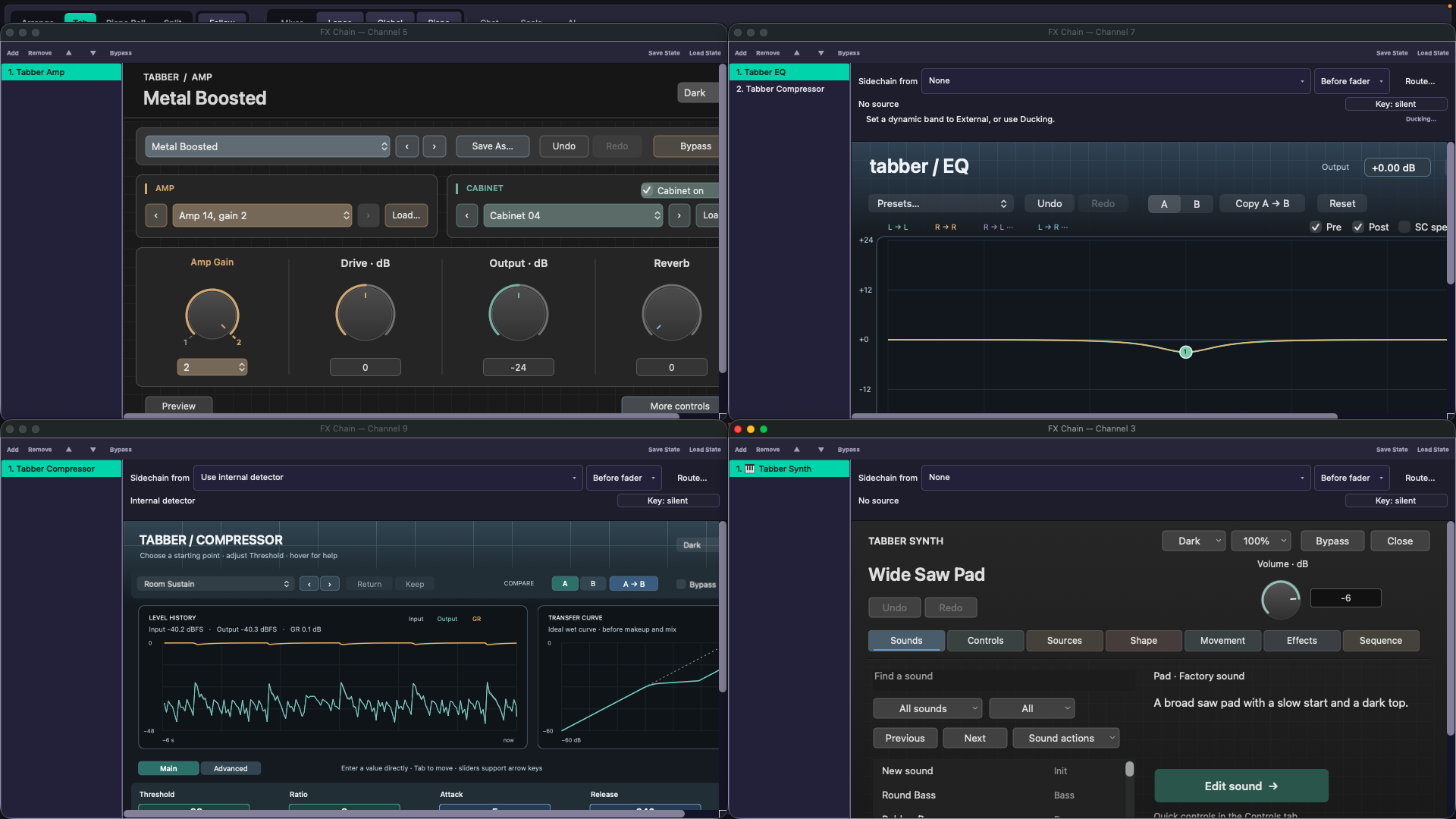
Tabber Amp, EQ, Compressor and Synth, each with a factory preset, while a song plays.
Windows 0.3.1
Playable chords and real repeat playback
Windows 0.3.1, 31 August 2026, build d9a23dd3
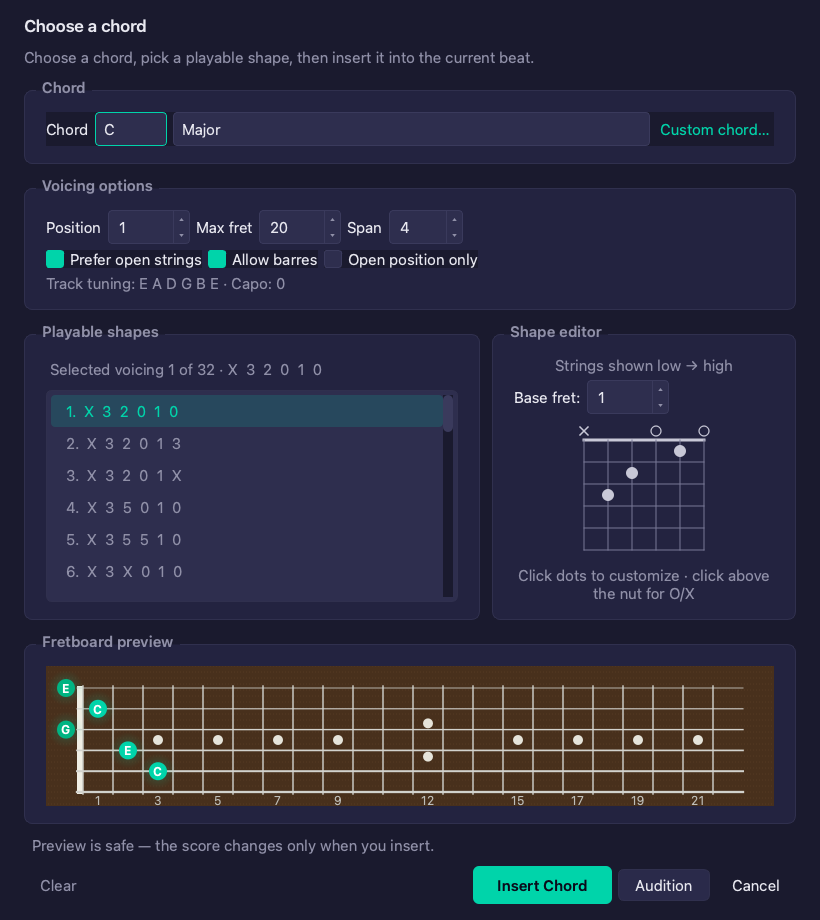
The Chord button now opens a complete chord picker. Choose a root and chord type, compare ranked playable guitar fingerings, adjust and audition a shape, then insert all chord notes together in Score, Piano Roll and Arrange as one undoable edit. Custom chord remains available for symbols such as D/F# or Cadd9. Imported repeats, volta endings and tempo changes now drive playback through one shared navigation plan while the written score stays compact. Undo, save, reload, the local Control API and assisted editing all use the same performed timeline, and existing projects can repair inert imported repeats without overwriting the project file.
Choose a chord, compare playable shapes and audition it before inserting.
Windows 0.3.1
Whole-app scaling and clearer workflows
Windows 0.3.1, 31 August 2026, build d9a23dd3
Preferences now offers Interface Size at 100%, 125%, 150% or 175%. It scales the shell, editors, mixer, routing, Tabber plug-in windows, dialogs, docks and compact layouts while editor zoom stays independent, and it applies after restarting Tabber Studio. First Recording and First Score open as separate replayable guides, and a fresh Piano Roll project creates a normal six-string first part that opens correctly in Score. Native Windows file dialogs and third-party plug-in windows keep the size the system gives them.
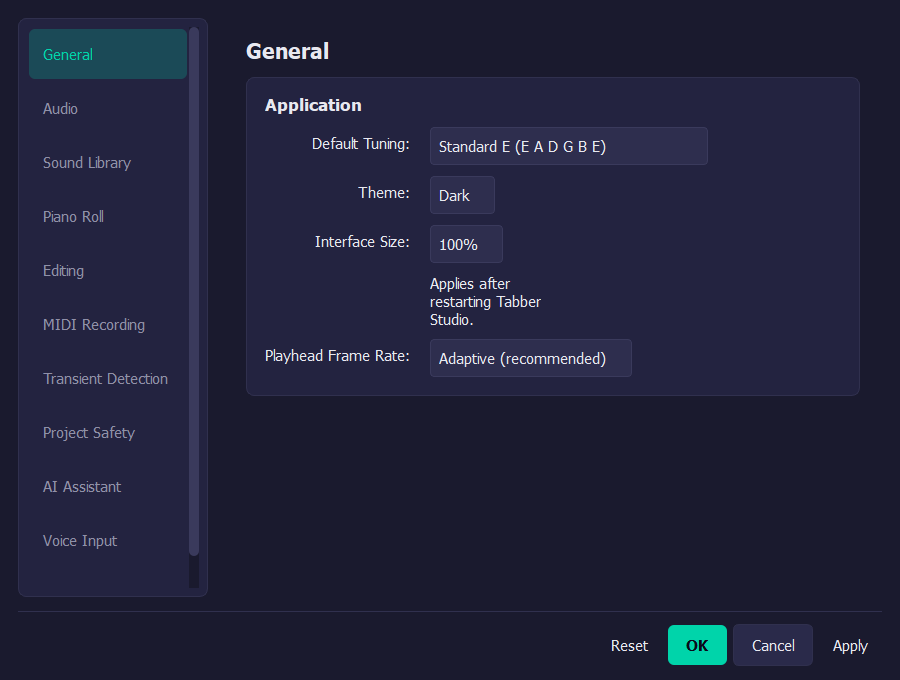
Interface Size scales the whole application and applies after a restart.
Windows 0.3.1
Performance view and a wider installer
Windows 0.3.1, 31 August 2026, build d9a23dd3
A Performance panel, and the local perf.get_overview call behind it, show shared headroom, thread load, per-track cost and plug-in cost so a project that struggles can be inspected rather than guessed at, and it adds no work to the audio callback. One x64 installer now admits Windows 10 22H2, build 19045 or newer, alongside Windows 11, and installs per user with no drivers and no elevation. The exact installer published here passed the automated Windows release gate, and all seven reference projects rendered sample-exactly on the certified engine.
Windows: WASAPI is the shipping audio backend, and VST3 and CLAP hosting, plug-in sandboxing and MIDI input and output remain Windows-native. Windows 11 may use Windows MIDI Services, while Windows 10 selects WinMM before that optional runtime is initialized. This release does not claim ASIO or ARM64.
Linux 0.3.0
Playable chords and real repeat playback
Linux 0.3.0, 15 August 2026, build 6e40aa2c
The Chord button now opens a complete chord picker. Choose a root and chord type, compare ranked playable guitar fingerings, adjust and audition a shape, then insert all chord notes together in Score, Piano Roll and Arrange as one undoable edit. Custom chord remains available for symbols such as D/F# or Cadd9. Imported repeat signs, counts and alternate endings now control playback and seeking while the written score stays compact. Undo, save, reload, the local Control API and assisted editing all use the same performed timeline, and existing projects can repair inert imported repeats without overwriting the project file.
Linux 0.3.0
Whole-app scaling and clearer workflows
Linux 0.3.0, 15 August 2026, build 6e40aa2c
Preferences now offers Interface Size at 100%, 125%, 150% or 175%. It scales the shell, editors, mixer, routing, Tabber plug-in windows, dialogs, docks and compact layouts while editor zoom remains independent. A fresh Piano Roll project creates a normal six-string first part that opens correctly in Score. First Recording and First Score have separate guides, Help search results run on one click and macro recording has a visible Stop control. MIDI inputs now distinguish present, selected and actively listening states; Save As updates Recent Files and new projects use a conventional Music/Tabber Studio folder.
Linux 0.3.0
Playback and AppImage hardened
Linux 0.3.0, 15 August 2026, build 6e40aa2c
Playback diagnostics and scheduling fixes remove the measured full-project stutters and keep large repeat-aware projects inside the existing performance limits. Five isolated 48 kHz / 256-frame plays completed with no xruns, deadline misses, silence, locks or dropped callbacks, and seven reference projects rendered sample-exactly. The exact AppImage also passed clean packaged-app tests for startup, VST3 and CLAP plug-ins, project save and reopen, transport and non-silent rendering.
Linux: PipeWire, JACK and ALSA routes, sfizz instruments, VST3 and CLAP hosting and AppImage packaging remain Linux-native.
macOS 0.2.0
Choose playable chords
macOS 0.2.0, 15 August 2026, build dac18d76
The Chord button now opens a complete chord picker. Choose a root and chord type, compare playable fingerings, adjust the shape and audition it before inserting. The chord's notes appear together in Score, Piano Roll and Arrange. Use Custom chord when you need symbols such as D/F# or Cadd9.
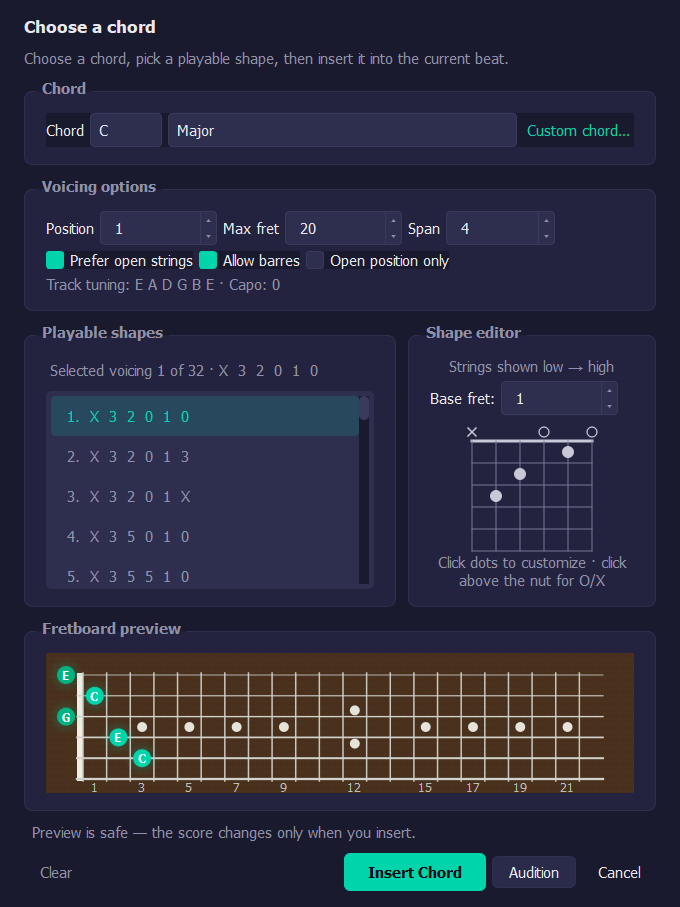
Choose a chord, compare playable shapes and audition it before inserting.
macOS 0.2.0
Piano Roll and Help fixes
macOS 0.2.0, 15 August 2026, build 22492fd4
Fresh projects now show Create First Part on the first Piano Roll visit and create a normal six-string part that opens correctly in Score. First Recording and First Score now open separate guides. Help search results run on one click, and macro recording has a visible Stop control.
macOS 0.2.0
Imported repeats control playback
macOS 0.2.0, 15 August 2026, build 7705af2c
Imported repeats now control playback while the score stays compact. Repeat toggles, counts, undo, save and reload all use the same performed timeline. Existing projects can repair inert imported repeats from the original source file without overwriting the project file.
macOS 0.2.0
Interface size settings
macOS 0.2.0, 12 August 2026, build 416edad9
Preferences now has an Interface Size setting: 100%, 125%, 150% or 175%. Save it and restart to apply. The whole interface scales, including Tabber's own plug-in windows. Editor zoom stays separate, and nothing in your project changes. Native plug-in windows and macOS file dialogs keep the size the system gives them.
Linux 0.1.3
More tuning presets
Linux 0.1.3, 10 August 2026, build 404684e1
Track Properties now has three six-string tuning presets: C G D G B E, D F D G B E and E G D G B E. Choosing one updates the project pitch map and saves with the project. Custom tunings and partial capos are not in yet; capo still applies to every string.
Windows 0.2.1
Faster, clearer startup
Windows 0.2.1, 9 August 2026, build 0104ee50
The long blank pause at launch is gone. The startup window now appears straight away and closes as soon as audio is ready. Guitar tones and the audio engine are unchanged from 0.2.0, and upgrading keeps your settings and projects.
macOS 0.2.0Windows 0.2.0Linux 0.1.2
Captured guitar tones
macOS 0.2.0, 8 August 2026; Windows 0.2.0, 9 August 2026, build 15515773; Linux 0.1.2, 9 August 2026, build 58b3d980
Overdriven Guitar now uses a captured Marshall JMP-50 Lead rig, and Distortion Guitar uses a captured boosted 6505+ rig. Both tones include four velocity layers, four round robins, release layers and matched palm-muted attacks. Sustained power chords keep their natural tails.
macOS: Power-chord symbols can now be authored through the local Control API.
Windows 0.1.3
Silent instruments fixed
Windows 0.1.3, 8 August 2026
Opening an imported score no longer drops an instrument family from songs with more than three, and all drum kits play again. Failed instruments now show an error. Autosave takes its first snapshot early and keeps saving while notes are entered.
macOS 0.2.0Windows 0.1.2Linux
Desktop window and panel fixes
macOS 0.2.0, 8 August 2026; Windows 0.1.2, 8 August 2026; Linux first public build, 7 August 2026
Dock panels show their close buttons again.
Windows: The first Windows build added a per-user Windows 11 x64 installer with no drivers or administrator rights. Window state and plug-in folder discovery now behave correctly.
Linux: The first Linux build added an AppImage for x86_64. Window size, position and full-screen state are remembered.
Analytics choice
Allow optional, self-hosted analytics to count visits, downloads
and approximate country? Privacy